Luxe Prints APC
1-800-311-5893
  • My Account
  • My Cart
  • Checkout
  • Log In
  • Order Prints
  • Home
  • The APC Difference
  • Options
  • Prices
  • Reviews
  • Home /
  • Blog /
  • Photography

Photography

  • How To Create a Collage Canvas Print

    July 15, 2013 Deals, Photography, Tips & Tutorials Write Comment

    Photo collages are great — in theory. You gather your best photos centered around a theme, and assemble them together to tell a visual story in an attractive way. But, if you’re like most of us, the time and technical expertise required to create a photo collage worthy of displaying is so daunting that those great ideas for collages fizzle pretty much as fast as they surface. To the rescue comes Artistic Photo Canvas.

    Meet your new favorite “thingamajig” on the web — where mere mortals can create awesome looking collage canvas prints in, well, mere minutes.

    APC’s new photo collage creator is robust and versatile enough to rock any theme. Yet it’s super easy to learn and fun to play with, meaning you can become a collage canvas ninja in no time!

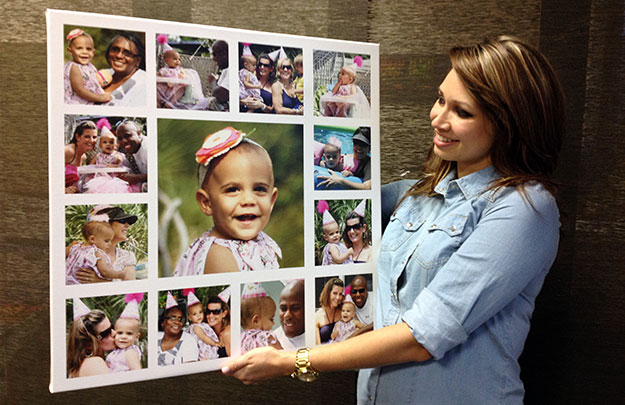
    Upload a few images and pick a template to get started. Keep your design simple if you’d like — or jazz it up with your own special mix of backgrounds, text, borders, shadows and glow effects. Don’t like uniformity? Go ahead and “mess up” your new photo arrangement with the touch of a button.

    A customer holds a 24" x 24" collage canvas by APC

    Is your imagination already brimming with ideas? Yup, we’re thinking the same thing — a collage on canvas would be perfect for celebrating and showing off your…

    best trips… best friends… favorite places… favorite things… cherished children, families and pets… dashing couples, engagements and weddings… awesome employees, coworkers and teammates… thrilling sports and outdoor adventures… daring digital designs, drawings, cartoons and artwork…

    Collage canvases by APC are for you, for your clients, for your friends — for every person you care about. So get started now. Turn your images into awesome.™

    Watch this short video to see how easy it is to create
    a collage canvas print of your own using the APC collage creator:

  • A Sure-Fire Way to Sell Prints to Clients

    March 5, 2013 Photography, Tips & Tutorials Write Comment

    By Scott Wyden Kivowitz

    If you have been trying to sell more printed photographs to clients but have been unsuccessful, consider adopting a new approach — one that takes guesswork out of the equation and allows your customers to easily visualize the beauty of your work — hanging in their home. Whether you are trying to sell canvas gallery wraps or framed photographs, the strategies in this article work the same.

    In the past, you’ve most likely relied on your clients’ abilities to “imagine” your photographs hanging on their walls. The problem with this approach is that many people do not possess an imagination vivid enough — or a sense of space and proportion reliable enough — to do that “imagining” effectively or confidently. The resulting lack of “vision” naturally leads to indecision and little or no motivation to buy.

    To sell more prints, you’ll need to go above and beyond the call of duty. You’ll need to “fill in the blanks” for them. By employing the following approach, you’ll awaken your clients’ vision, enabling them to confidently commit to their print purchases.

    Gallery wrapped panoramic canvas print of a skyline

    Step 1: The Scene

    Option A: Photograph a living room or other interior scene that is clean and elegant and features an empty wall prominently.

    Option B: Purchase a photograph of a similar scene at a stock photography site such as iStockPhoto. Here’s one by Shenki.

    Step 2: The Template

    Now that you have a photograph of a beautiful room with an empty wall, it is time to create a template for prints. I suggest two templates:

    Template A: First, I recommend a template for showing canvas prints. This one is very simple because, viewed head-on, it’s not necessary to create the wrapped edges. The easiest way to simulate the floating gallery wrap effect that is so magical is to add a very subtle drop shadow.

    Template B: The second template is trickier. To simulate a framed print, you want to create an empty picture frame that is elegant. You could return to your stock photo site and purchase a picture frame template, or find a Photoshop tutorial on how to create your own.

    Somewhere in the template, you can optionally add a price, or text that includes language such as “Want this photograph on your wall?” Even without text, having your client’s photograph hanging on a wall will subliminally make an impact.

    Remember, once you have your templates created, you never have to recreate them.

    Step 3: The Print

    Take your favorite photograph from your client’s session and place it inside of your new template, whether a framed or canvas print. Save the image with the photograph hanging above a couch, for example, and keep it with the session’s photographs that you plan to upload for proofing.

    Step 4: Include

    Hopefully the proofing solution you are using for your clients has a place where you can insert custom HTML content. Once the gallery is uploaded and ready for viewing, add the new hanging photo image to the top of the proofing gallery, making sure it’s the first thing the client will see when visiting the gallery. Continue reading →

  • Black and White - From Snapshots to Great Shots

    September 1, 2011 Photography Write Comment

    Renowned pro shooter and author John Batdorff has once again teamed up with Peachpit Press to bring photographers a thorough reference guide for bringing their work to the next level — this time with a focus on achieving the perfectly balanced black and white photograph. In Batdorff's new guide, Black and White — From Snapshots to Great Shots, you'll get tips on everything from setting up your camera kit to DSLR shooting techniques to post processing in Adobe Lightroom and achieving the perfect print.

    Check out Chapter 6 for information on printing, posting, and sharing your work. John is no stranger to Artistic Photo Canvas when it comes to displaying his award winning photography on our gallery wraps. In fact, he has a huge 40" x 60" gallery wrapped canvas print from APC featuring his new book’s cover photograph hanging at home.

    Those mastering their black and white photography skills with John's help can share their photos with the book's Flickr group!

    Here’s a description of the book from the publisher:

    Now that you’ve bought that amazing new DSLR, you need a book that goes beyond the camera manual to capture stunning images. For digital photographers interested in black and white, this guide will help beginning- and intermediate-level shooters conquer the fundamentals and take amazing shots.

    Pro photographer John Batdorff starts with the basics, including composition, light, contrast, exposure, and when to choose black and white. He covers all the key camera features (regardless of what type of DSLR you have) that affect your image, including the shutter speed’s ability to freeze and convey motion, and the aperture’s direct correlation with depth of field.

    Once you’ve captured those great shots, John takes you step by step through the color conversion process to black and white in Adobe Photoshop Lightroom using simple presets. He also covers the enhancements and features that can be added using Nik Silver Efex Pro software–from presets to control points using U-Point Technology.

    Follow along with your friendly and knowledgeable guide and you will:

    • Learn to see in black and white by understanding contrast, texture, and lighting
    • Understand all the best tricks and techniques for getting great black and white action shots, landscapes, and portraits
    • Create your own digital workflow by understanding the basics of post processing in Lightroom, then go beyond the basics with Nik Silver Efex Pro
    • Share your images and learn tips on printing and presenting your work online

    And once you've got the shot, show it off! Join the book's Flickr group, share your photos, and discuss how you use your camera to get great black and white shots.

  • 10.5 Ways to Capture Better Images

    April 22, 2011 Contests & Giveaways, Photography, Tips & Tutorials Write Comment

    Prize Alert! …Read on to see how you could win one of five signed copies of Doug Sahlin's latest book, Digital SLR Settings & Shortcuts for Dummies.

    By Doug Sahlin

    The goal of every serious photographer is to create the most compelling image possible; an image that viewers give more than just a casual glance. Here are 10.5 ways to achieve this goal:

    1. Pick the low hanging fruit first: When you see a scene or object worth photographing, take the first picture that comes to your mind. Then slow down and analyze what you’ve got. Move around until you see the composition that best captures your vision and take another picture. Repeat as needed.

    2. Simplify: Some photographers try to include too much information in a photograph. When you compose a photograph, see what’s in the viewfinder. If what you see is confusing, zoom in to remove some of the elements. Cut to the chase and simplify the image. Less is more.

    3. Wait for the light: Sometimes you’re in the right place at the wrong time. If the light is harsh (also known as “Sucky Light”), wait a few minutes for clouds to diffuse the sunlight, or come back when the light is better.

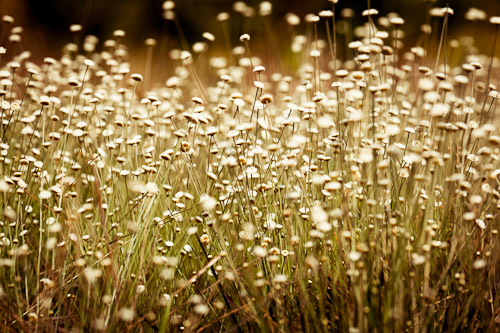
    Wildflowers in a Field - copyright 2011 by Doug Sahlin

    4. Do something different: Einstein’s definition of insanity is doing the same thing over and over again and expecting different results. When you see an object or scene that you want to photograph, don’t photograph it in the same way you usually do. If you normally use a wide-angle lens, switch to a telephoto lens or switch to a different vantage point. Break out of your rut and stretch the envelope.

    5. Photograph a shape: Many photographers photograph objects like trees, buildings or cars. Instead of photographing a tree, look for an interesting shape that just happens to be a tree. You don’t have to photograph the entire object. Sometimes you find an interesting shape within an object. You can find interesting shapes everywhere.

    6. Look for patterns: Instead of photographing a forest or a group of flowers, look for an interesting pattern, or look for a break in a pattern. Continue reading →

  • Auction for Japan

    April 7, 2011 Inspiration, Photography Write Comment

    Reprinted with permission from JFLPhotography.com

    By Jacob Lucas

    TO BID ON THIS ONE-OF-A-KIND PIECE OF ART, HEAD OVER TO OUR EBAY PAGE.

    At 2:46PM on Friday March 11th 2011, an absolutely massive earthquake struck in the Pacific Ocean off the coast of Japan. At a 9.0 magnitude, it’s the earth’s 4th largest earthquake and the largest earthquake to have ever hit Japan in recorded history. Shortly thereafter, giant tsunami waves breached the coast of Japan leaving behind them a wake of sheer devastation. Over ten thousand people were killed, and tens of thousands more are still today injured or missing. The nation is still managing the further devastation caused to the country’s transit and power industries, with a very real threat of a nuclear fallout in the greater area around Sendai and Fukushima.

    Growing up, Australia was a very popular tourist destination for Japan, and directly influenced my country’s now multi-cultural society. In high school and at university, I invested a lot of my time studying not only the Japanese language but also their culture and way of life. I’ve spent three months in Ibaraki prefecture, about three hours north of Tokyo, as an exchange student living with a family and experiencing the country and the way of life first-hand. At heart, they are truly a peaceful and honourable people who definitely do not deserve to suffer the effects of this terrible tragedy.

    I instantly knew I wanted to help and worked to find a way. I’m pleased to be able to provide a print of this image entitled “Cherry Sunrise”, of cherry blossom trees native to Japan and in full bloom at this time of year, for auction. All proceeds of the auction will go directly towards the relief efforts orchestrated by the American Red Cross.

    Cherry Blossoms by Jacob Lucas

    Now YOU can help too.

    I’m thrilled to say that the crew at Artistic Photo Canvas have graciously offered to provide the printing services. This image will be printed on a HUGE 24¨x36¨ gallery wrapped canvas. If you’ve never seen the fabulous work that APC provide in their canvas printing, these canvases really do make photographs come to life in a beautiful way and their staff are truly wonderful people. The canvas will come shipped to you, ready to hang on your wall.

    TO BID ON THIS ONE-OF-A-KIND PIECE OF ART, HEAD OVER TO OUR EBAY PAGE.

    I encourage everyone to really dig deep and bid to help the people of Japan overcome the devastation caused by this tragedy. Bidding will start at just US$49. It’s never too late to help.

    More information:

    ARTISTIC PHOTO CANVAS
    AMERICAN RED CROSS

    Jacob LucasJacob Lucas is a Seattle based photographer, originally from Hobart, Australia.


  • PSW Class Notes: Small Flash Basics & Hot Shoe Flash

    April 1, 2011 Events, Photography, Tips & Tutorials Write Comment

    By Chris Stampar

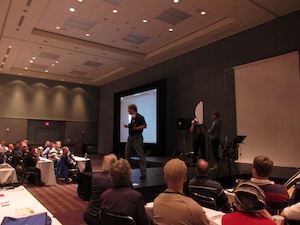
    Joe McNally lectures on Small Flash Basics at Photoshop World in Orlando, March 2011Joe McNally is the master of all things flash, so there was no way I could miss his speed light session at Photoshop World on Thursday morning. Joe's first class focused on getting the most out of one light, and the results are truly amazing. Often people think that to produce beautifully lit photos you need some seriously expensive studio equipment. But that's no longer the case; a small investment into a single speed light and some very cheap, or even DIY light modifiers, can go a long way.

    The first thing Joe pointed out were the three essentials of light: quality, color, and direction. In terms of quality, are we going to use a large, soft light source like an octabank, or will we only fire the bare bulb for harsh lighting effects? More importantly, what effect will that decision have on the mood or feeling of the photo?

    Next is color. Are you looking for daylight balanced flash for a natural look, or will you add a gel to give a colorful flare to your photos? Color is critical, and understanding color symbolism, or the mood that certain colors elicit, is even more beneficial.

    Joe McNally teaches Small Flash Basics at Photoshop World in Orlando, FL, March 2011And lastly, direction. Where will you place your light source and how will this affect your exposure, story, feeling, even composition?

    Joe of course also offered a couple of technical tips to boot. First, the closer the light source is to your subject, the bigger it is relative to the subject, and the softer the light will be. It's also important to understand the difference between exposure compensation and flash compensation. Changing your camera's exposure comp is a "global change" and will affect all aspects of the photo including the ambient light and the effect the flash has on your overall exposure. Changing your flash compensation however, only alters the amount of light that comes from the flash and not the overall exposure of the picture.

    Lastly, using flash is all about experimentation. Don't be afraid to make mistakes, just learn from them! Continue reading →

  • PSW Class Notes: Photo Retouching for Photographers

    March 31, 2011 Events, Photography, Tips & Tutorials Write Comment

    By Chris Stampar

    I attended Scott Kelby's session on Portrait Retouching at Photoshop World. As you could probably guess, it was awesome. Scott is one of the best teachers around. He's got such a relaxed and humorous yet informative teaching style.

    Here are some of the best tips I gleaned from the session:

    Scott puts a lot of emphasis on a model's eyes, and showed an easy way to remove red blood vessels in the eyes in Photoshop. First, choose a small soft brush, set it to 20% opacity, then sample the color directly next to the vein and just paint over it. That simple. Just always make sure you resample next to the vein you want to remove for the most accurate and realistic retouch. And if you think that the resulting texture is a little too unrealistic in the eye, just go to the filter menu, choose add noise, and brush in a little monochromatic noise into the retouched area of the eye for added realism.

    Another great tip for enhancing the eyes is to add an extra catchlight that looks like a soft reflection. Take your Elliptical tool and draw a small oval. Then cut out of chunk of the oval so you end up with a "crescent moon" shaped selection. Fill the selection with white, add a small blur to it in the filter menu, and set the blending mode to soft light. Position the shape appropriately in the eye, and now you have a nice kicker light effect to add a little pop to the photo.

    Moreover, Scott pointed out that you should start every retouch by first removing all blemishes on the subject before you try any other retouching techniques. This will lead to the best results after further retouching. Continue reading →

  • PSW Class Notes: Making an Online Portfolio

    March 31, 2011 Events, Photography, Tips & Tutorials Write Comment

    By Chris Stampar

    The first class I attended at Photoshop World was hosted by RC Concepcion and discussed how photographers can easily get their photos on the web without having to know any technical code. RC focused on some basic tips and ideas of website development as well as free resources on the web. For instance, you can create a full slideshow of your images for free by uploading photos to a set on Flickr, then clicking the "share" button in that set and copy and pasting the HTML code provided for you. You can then embed this full-fledged slideshow anywhere on the web for free, and only with the click of your mouse. No coding necessary! You can also easily leverage Flickr to generate traffic to your website/blog by tagging your photos with relevant tags (city, state, subject, camera, etc.) and including a link to your site in the caption. How easy is that!?

    If you would like to get a little more technical, the Google Chrome web browser includes some great development tools free of charge. Say you're previewing your website in Chrome, but would like to know what an element would look like if it were slightly larger. Instead of going into the files on your computer, changing settings, and re-uploading just to test something, you can preview any changes right in the browser. Simply right click on any element on your site and select "Inspect Element." A new window will appear with the source code of your site. Click the element you want to change and Google will highlight where the code is for that specific object. You can then change any of it's properties like width or height and you'll see those changes instantly in browser. This is a non-destructive, non-permanent way to quickly preview small changes before digging into to your website files and having to re-upload. My little tip is that you can also do this in Firefox with the free FireBug extension. Continue reading →

  • Be our guest at Photoshop World's Tech Expo

    March 26, 2011 Events, Photography Write Comment

    Even if you’re not registered for the Photoshop World Conference in Orlando, you can still attend the PSW Tech Expo for a day (or even two) as a guest of Artistic Photo Canvas, an official sponsor. Just click on the Expo Pass below to get to the full-size version. Print the APC Free Expo Pass out and present it at the Expo doors on Thursday, March 31 or Friday, April 1 when the event will be open to the public. You’ll score free admission for two – a $40 value.

    APC Photoshop World Tech Expo Free Pass

    There are dozens of classes and demonstrations taking place on the Expo floor every day – so, in addition to checking out the latest offerings from APC and the many other exhibitors on the floor – you can also take advantage of some great, free training presented by some of the biggest names in photography and Photoshop!  Here's a schedule of bonus classes taking place in the Expo theatres: Continue reading →

  • “Following Through” with Your Photography

    January 26, 2011 Inspiration, Photography Write Comment

    By Brian Matiash, Photographer

    All throughout my formative years growing up, and even through to today, there has always been one lesson that was constantly reinforced. It revolves around a common theme that is just as applicable in a boardroom as it is on the golf course. That lesson is to always “follow through.”

    If you take a moment to think about it, you’ll start to realize just how many different applications where following through benefits the action taken. It affects the spiral of your football throw, the top-spin on your tennis swing, and the trajectory of the baseball after you swing your bat. Your parents, your teachers, and your coaches – they all understand the importance of following through. This concept translates into the professional arena as well. Make promises to a client? Offer your services to a prospect? Following through effectively on all of these commitments will help ensure your success.

    And now, it’s time to realize how to follow through with your photography.
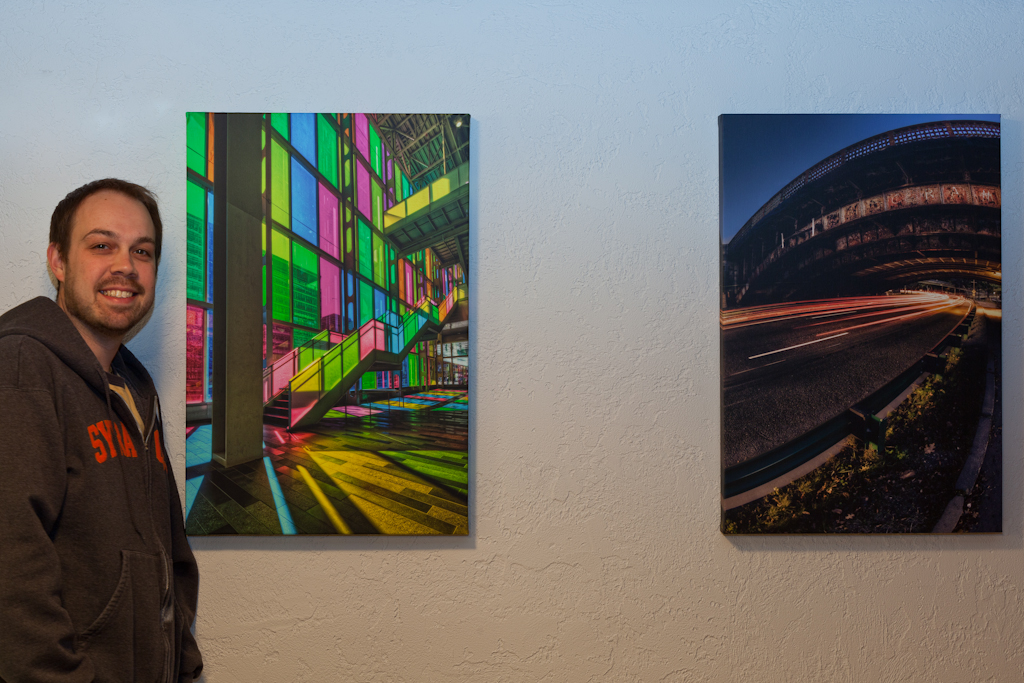
    Urban architecture photographer Brian Matiash poses with some of his Artistic Photo Canvas gallery wraps

    To illustrate how the concept of following through in photography came to fruition for me, let me refer to my bucket list. You know… that list of photos that you want to get before you kick it (the bucket, that is). I was born and raised in New York City and for the longest time, I’ve always wanted to get my own panoramic HDR of this iconic skyline. I had a general idea of what my vantage point would be and it just involved waiting for the optimal light and timing.

    After a few missed attempts, I finally found myself in the right place, at the right time, and made my way to Hoboken, NJ to get my shot. I ended up scouting for about 4.5 hours for the perfect location. Most of the time was used to burn the daytime light until I was left with Manhattan perfectly lit, each building jewel-encrusted with the office lights that remained on at dusk.  After a few quick test shots and some minor rejiggering, I was ready to get my bracket panels. I had my laptop tethered to my camera and fired my shots. And then I fired my shots again, just for insurance. I immediately ran the brackets through the tone-mapping process and then merged the HDR panels into a rough cut of the panoramic image. I was thrilled with what I saw and knew that I got the shot.

    Brian Matiash's HDR images are reproduced on canvas by Artistic Photo Canvas

    But still, even after all was said and done, I didn’t feel like I had anything to show for it. Sure, I was staring at the final HDR pano of the NYC skyline on my display. I could share it out on my blog, Twitter, Facebook, Flickr, and everywhere in between. Technically, I could check it off the bucket list. But, I didn’t feel like I truly realized my intent. And that’s where Artistic Photo Canvas came in. The way that I would follow through with this panoramic photo that I went to great lengths to capture would be to have it printed on a massive canvas. I ended up placing an order with APC for a 5-foot canvas print.
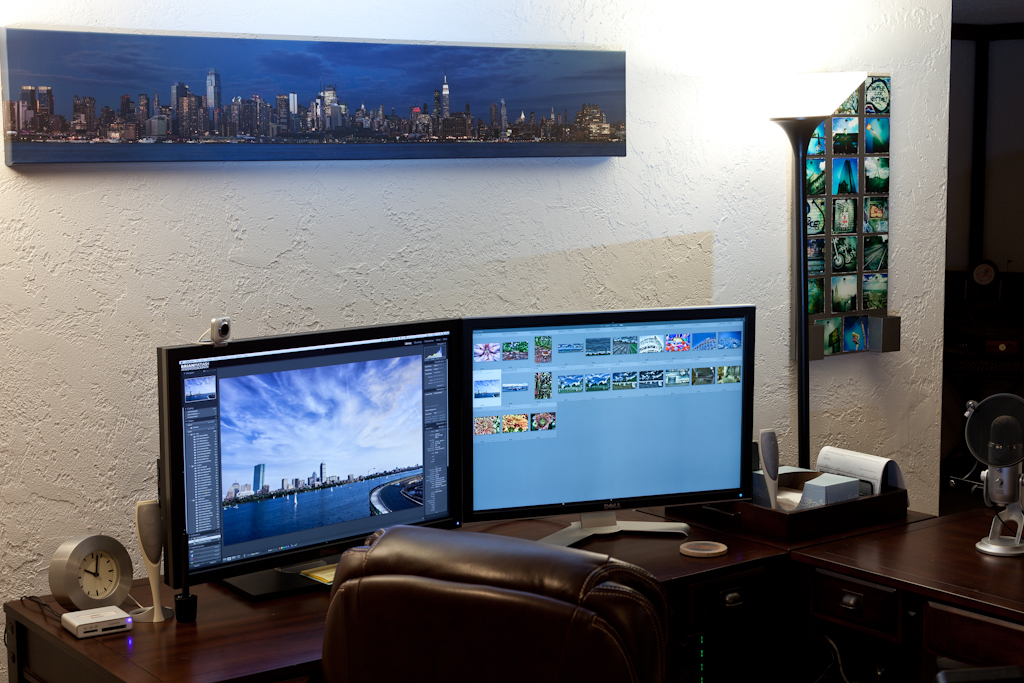
    5-foot panoramic gallery wrap of the New York City skyline, by HDR photographer Brian Matiash

    I cannot honestly think of a more appropriate way of following through than by having my print taken off of my LCD and made tangible by the amazing folks at APC. I was simply floored by the quality of this canvas print that I was holding in my hands. There is something very special about holding a massive 5-foot print that you took and be able to see all of the little details up close. It is one thing to magnify the image on your display. It’s a totally different thing to feel your image in your hands through the texture of the canvas. It was at that moment that I knew what I had to do with my images going forward. And as you can see by the photos of my office that accompany this post, I’ve now “followed through” with many of my favorite shots. My gallery wraps have become the reward for my efforts and a testament to my achievements. They’ve become the “follow through” for my photography.
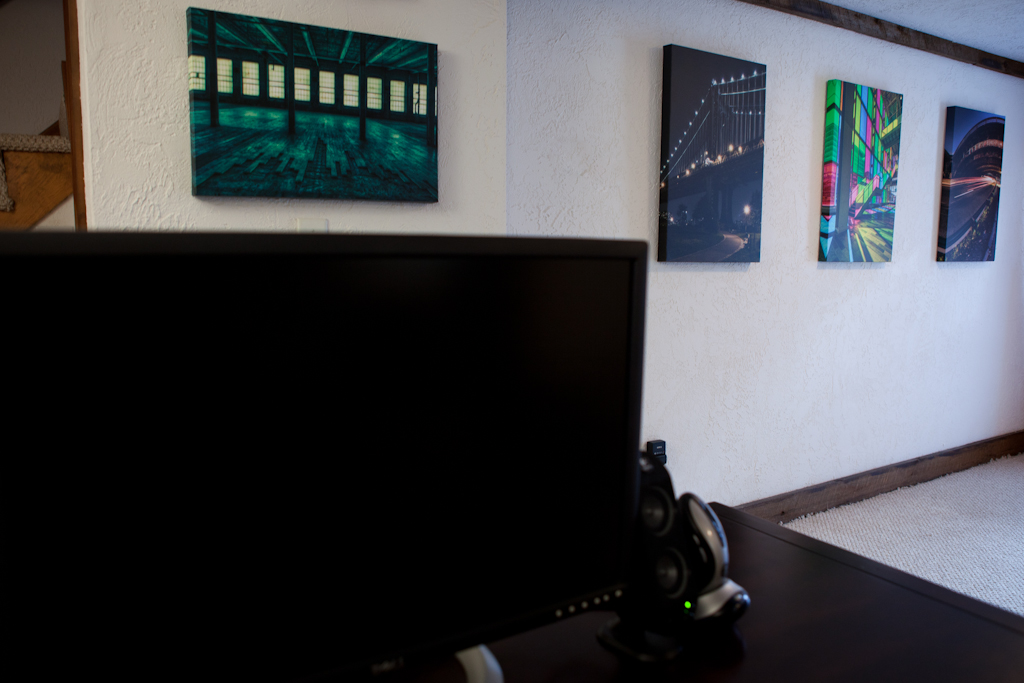
    Gallery wraps from Artistic Photo Canvas adorn the walls of photographer Brian Matiash's office Close up of Italy ruins, canvas gallery wrap by HDR photographer, Brian Matiash

    So the next time you grab a shot that you are just totally excited about, think about really following through with it. Take it off of your display and put it into your hands, or the hands of a loved one. I can’t think of a better way of breathing new life into my images than by adding the sense of touch to the sense of sight. And I cannot think of anyone better than APC with whom I’d entrust this process to. Give it a shot for yourself. Follow through.

    Cheers,
    Brian


    Learn HDR with Brian Matiash:
    HDR Best Practices Guide Part I: In The Field
    HDR Best Practices Guide Part II: Image Management
    HDR Best Practices Guide Part III: Post Processing

    Brian MatiashBrian Matiash is the Curriculum & Education Manager at onOne Software, makers of the award-winning Perfect Photo Suite line of photography software. He is responsible for creating new and compelling educational content to help spur excitement and creativity around digital photography. He is also an also an urban/architecture photographer, writer, and lover of all things social media.

    Brian has spent the past several years learning and mastering the use of High Dynamic Range (HDR) imaging to create photos with a level of realism not normally captured with conventional photography. He is the author of a monthly column on ProPhotoResource, where he shares tips, tricks, and techniques to gain the most out of HDR photography. He is also an editor at 'HDR Spotting', the leading gallery/resource dedicated to showcasing HDR images. Continue reading →

Items 11 to 20 of 35 total

Page:
  1. Previous
  2. 1
  3. 2
  4. 3
  5. 4
  6. Next
Search
Recent Posts
  • Wild Wednesday: Red-Eyed Tree Frog
  • In the Limelight: Lou Newman
  • In the Limelight: Nick Nieto
Categories
  • Art
  • Contests & Giveaways
  • Deals
  • Events
  • Inspiration
  • Musings
  • Photography
  • Polls
  • Tips & Tutorials
  • Unboxings
Canvas Prints and Gallery Wraps from Artistic Photo Canvas
Tags
  • Christmas
  • Collage
  • Corey Barker
  • holiday
  • humanitarian photography
  • In The Limelight
  • landscape photography
  • LayersTV
  • nature photography
  • NYC skyline
  • panorama
  • photo collage
  • RC Concepcion
  • shipping
  • travel photography
  • Tutorial
  • wild wednesday
  • wildlife photography
APC on Facebook
APC on Twitter
Follow @APCpro
My Cart

You have no items in your shopping cart.

Order Prints
ARTISITIC PHOTO CANVAS
  • Contact Us
  • About APC
  • Options
  • Prices
  • Ideas & Inspiration
  • The APC Difference
  • Photo Canvas Blog
  • Testimonials
  • ProZone
  • Gift Cards
  • Privacy Policy
Tweets about APC
    Get in touch

    Need help?  Call us!
    Monday-Friday 10am-5pm Eastern
    1-800-311-LUXE

    Socialize with us
    • Subscribe to our Blog
    • Connect with us on Facebook
    • Follow us on Twitter
    • See some cool photos
    • See some cool videos

    Copyright © 2005-2026 Luxe Prints LLC. All rights reserved.   Terms of Use

    Credit Cards