
Want a reprint of a gallery wrapped, framed or unstretched canvas print you've previously ordered from Artistic Photo Canvas — but don't want to start a new order from scratch? No problem! You can get APC reprints while bypassing the entire canvas configuration process. It's fast and easy to do!
Here's how: Log in to your APC account by clicking the "My Account" link at the top of any page at artisticphotocanvas.com.
 Figure 1 - Logging in to your Artistic Photo Canvas account
Click on "My Orders" in the navigation bar running down the left side of your account "Dashboard." You'll see all of the previous orders you've placed using this account since July 5, 2011. Browse through the list until you find the order(s) that contain(s) the canvas you want reprinted. To double-check you've got the right previous order from which you want a reprint, click on the "View Order" link to the right of any order listed. (Not the right order? Simply click on "My Orders" again and navigate to a different one.)
 Figure 2 - Viewing your previous orders via the "My Orders" link
If you scroll down, you'll see the canvas(es) that were part of the selected order. Here you can confirm that the size, style, options and image are the ones you were looking for. If you want to reorder one or more of the canvases on this order, scroll up and click on the "Reorder" link near the top of the page. (To get reprints from more than one order, simply click on the "My Account" link at the top of the page and then "My Orders" again in the left-hand navigation pane and repeat the "Reorder" process.)
 Figure 3 - Confirming previous order details and using the "Reorder" link
After clicking on "Reorder," you will advance to the Shopping Cart, where all canvases from previous orders you've selected for "Reprint" will have been added to your cart, exactly as you previously configured them. If your previous order(s) contained more than one canvas and you don't want to reprint all of them, you can easily delete any canvas you don't want to reorder by clicking the "X" to the right of it. You can also adjust the quantity of each item in your cart from this screen. [fig. 4]
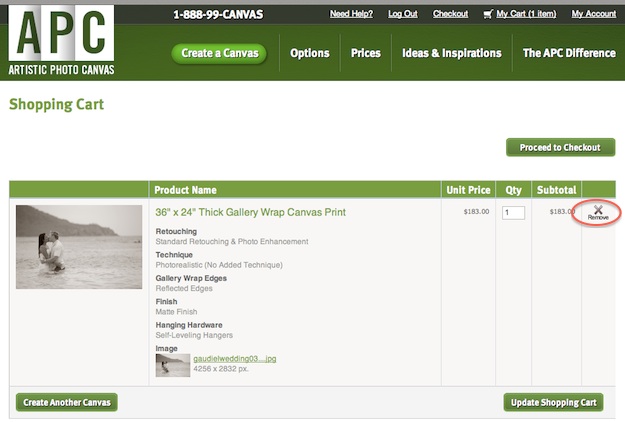 Figure 4 - Deleting a canvas from your reorder
Voila! Having confirmed your reprint details, you're now ready to proceed through the checkout process. Ready to try it? Get started.




10 HOURS ONLY! HUGE 25% OFF REPRINTS from previous orders w/code REPRINT25. Here's how: http://t.co/50JgfoLH Ends midnight ET
The bug preventing some customers from activating the 25% OFF promo code for reprints has been resolved! :-) http://t.co/50JgfoLH
25% OFF REPRINTS — 2 Days Only! Here's how: http://t.co/7871oQOU Use promo code REPRINT25. Ends midnight ET 10/17 #TwitterTuesday
25% OFF REPRINTS — 2 Days Only! Here's how: http://t.co/7871oQOU Use promo code REPRINT25. Ends midnight ET 10/17 #TwitterTuesday
Friends/fam lusting after your APC prints? Get reprints for 25% OFF (!) w/code REPRINT25 thru 10/17. Here's how: http://t.co/7871oQOU
Art show / sale coming up? Stock up & save! 25% OFF REPRINTS continues thru midnight ET w/code REPRINT25. Here's how: http://t.co/7871oQOU
Share your best prints — or stock up to sell! 25%OFF REPRINTS now thru 1/7 w/promo code REPRINT25. http://t.co/7871oQOU
9+ hours remaining to GET 25% OFF REPRINTS. Share your best — and stock up to sell! Promo code REPRINT25 http://t.co/7871oQOU
Share your best prints — or stock up to sell! 25%OFF REPRINTS now thru 1/7 w/promo code REPRINT25. http://t.co/7871oQOU