Luxe Prints APC
1-800-311-5893
  • My Account
  • My Cart
  • Checkout
  • Log In
  • Order Prints
  • Home
  • The APC Difference
  • Options
  • Prices
  • Reviews
  • Home /
  • Blog

The Photo Canvas Blog

  • APC on Earth Day and Every Day

    April 22, 2011 Musings Write Comment

    By Lew Bedell

    In 2005, the founders of Artistic Photo Canvas and its freshly assembled team of imaging experts didn't jump on the eco-friendly bandwagon… In reality – when it comes to the canvas printing industry – it's much more fair to say we drove it.

    From the beginning – and in stark contrast to other canvas labs even to this day – we made choices that would be right for your images and right for the planet. So, on the occasion of Earth Day, we wanted to share some of the milestones on our journey of environmental stewardship with you. We hope you'll agree that on Earth Day – and every day – it matters.

    Artistic Photo Canvas prints are OBA-free. Always have been. Always will be.To reduce APC's impact on the environment, we committed ourselves from the very outset to using a superior set of materials to create each and every canvas print we sell. For example, unlike 99% of inkjet canvas buyers, we pay a little more to procure canvas that is produced without optical brightener additives, fluorescent whitening agents and other harmful chemical agents. Ironically, the higher quality canvas we print on is a significantly brighter white to begin with in spite of the disuse of these chemical agents. And because there are no OBAs to break down, our prints do not fade or yellow with the passage of time.

    In addition – and also unlike the majority of our competitors – the protective coatings we apply to each canvas are water-based instead of solvent-based. Solvent-based coatings not only create toxic fumes that are dangerous to those who apply them, they require the production and use of chemical agents that are known to seep into groundwater. When we made the choice to forego solvents, we were determined not to sacrifice the archival and UV-inhibiting properties of a great top coat. It turns out, our unique combination of canvas, inks and coatings has been rewarded with a rating that means our canvases will withstand deterioration for in excess of 150 years, this according to Wilhelm Imaging Research, the leading worldwide authority on print longevity.

    Some of our competitors started using cheap plastic stretcher frames, but we found them to be both aesthetically and environmentally wrong. Instead, we chose to use solid-wood stretcher bars made from wood harvested in managed forests – and mill them in-house so we could recycle all waste. But we recognized we should do more to help reverse the ravages of deforestation. So, APC committed to supporting the efforts of Global ReLeaf, a program of American Forests that has already resulted in the planting and care of more than 25 million trees through 500 projects worldwide.

    APC's commitment to sustainability has even extended to the way we pack and ship the canvases we create. Our slim, heavyweight shipping cartons were custom designed to avoid excess volume and are made with roughly 30% post-consumer recycled content. All scrap cardboard created during our custom manufacturing process is baled and sent for recycling. And – unlike competitors that fill their cartons with foam peanuts, plastic air bags, bubble wrap, kraft paper and other wasteful cushioning materials – APC's shipping cartons have been specifically engineered to effectively utilize minimal packing materials and instead leverage air space to protect our canvases in transit.

    Perhaps just as important, we've worked to keep our canvas print prices remarkably low – competitive even with the inferior and environmentally unfriendly canvas prints sold by “traditional” labs – so you don't have to sacrifice savings to do good for the planet.
  • 10.5 Ways to Capture Better Images

    April 22, 2011 Contests & Giveaways, Photography, Tips & Tutorials Write Comment

    Prize Alert! …Read on to see how you could win one of five signed copies of Doug Sahlin's latest book, Digital SLR Settings & Shortcuts for Dummies.

    By Doug Sahlin

    The goal of every serious photographer is to create the most compelling image possible; an image that viewers give more than just a casual glance. Here are 10.5 ways to achieve this goal:

    1. Pick the low hanging fruit first: When you see a scene or object worth photographing, take the first picture that comes to your mind. Then slow down and analyze what you’ve got. Move around until you see the composition that best captures your vision and take another picture. Repeat as needed.

    2. Simplify: Some photographers try to include too much information in a photograph. When you compose a photograph, see what’s in the viewfinder. If what you see is confusing, zoom in to remove some of the elements. Cut to the chase and simplify the image. Less is more.

    3. Wait for the light: Sometimes you’re in the right place at the wrong time. If the light is harsh (also known as “Sucky Light”), wait a few minutes for clouds to diffuse the sunlight, or come back when the light is better.

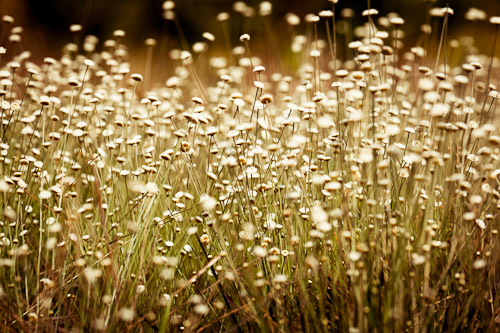
    Wildflowers in a Field - copyright 2011 by Doug Sahlin

    4. Do something different: Einstein’s definition of insanity is doing the same thing over and over again and expecting different results. When you see an object or scene that you want to photograph, don’t photograph it in the same way you usually do. If you normally use a wide-angle lens, switch to a telephoto lens or switch to a different vantage point. Break out of your rut and stretch the envelope.

    5. Photograph a shape: Many photographers photograph objects like trees, buildings or cars. Instead of photographing a tree, look for an interesting shape that just happens to be a tree. You don’t have to photograph the entire object. Sometimes you find an interesting shape within an object. You can find interesting shapes everywhere.

    6. Look for patterns: Instead of photographing a forest or a group of flowers, look for an interesting pattern, or look for a break in a pattern. Continue reading →

  • Canvas Print of the Day: Maestro

    April 13, 2011 Inspiration Write Comment

    Gallery wrapped canvas inspiration – served up from time to time
    with the generous permission of APC’s awesome customers!

    Photographer: Geoff Coe
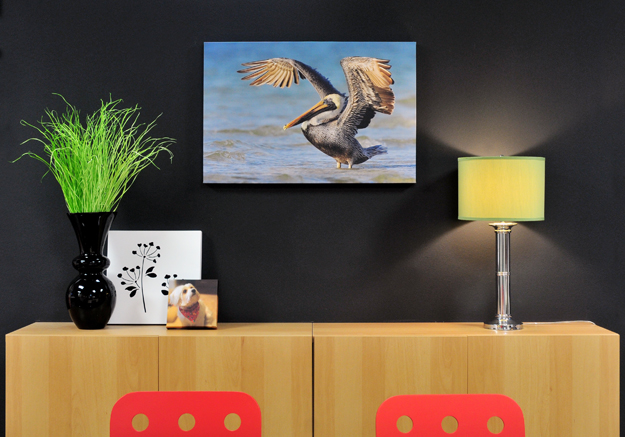
    Subject: "Maestro"
    Size: 36 x 24 gallery wrap

    “On some mornings I know what I want to photograph. Other times, I just head out to my favorite bird beach on the Gulf of Mexico and wait for great light, then find a good subject. That was the story behind ‘The Maestro.’

    “I saw the early morning sun starting to break through some low-hanging clouds to the southeast and could literally see great light moving toward me on the bay. Looking around, I saw several Brown Pelicans diving for fish offshore, and quickly moved out onto a sandbar to get as close as I could. Not close enough – so I moved off the bar into about two feet of water and set up my Gitzo tripod and Canon 50D with a 500mm lens and 1.4x teleconverter. Right on cue, this Pelican dove for, and caught, a redfish. Then, his meal complete, he stretched out his wings in the beautiful light.

    “He reminded me of an orchestra leader calling the musicians to attention. Hence, the title.”  – Geoff

    Geoff Coe is a Fort Myers, Florida-based wildlife photographer and workshop leader.

    Ready to order canvas prints of your own? You'll love the winning combination of superior quality, great service and exceptional value at Artistic Photo Canvas.

  • Auction for Japan

    April 7, 2011 Inspiration, Photography Write Comment

    Reprinted with permission from JFLPhotography.com

    By Jacob Lucas

    TO BID ON THIS ONE-OF-A-KIND PIECE OF ART, HEAD OVER TO OUR EBAY PAGE.

    At 2:46PM on Friday March 11th 2011, an absolutely massive earthquake struck in the Pacific Ocean off the coast of Japan. At a 9.0 magnitude, it’s the earth’s 4th largest earthquake and the largest earthquake to have ever hit Japan in recorded history. Shortly thereafter, giant tsunami waves breached the coast of Japan leaving behind them a wake of sheer devastation. Over ten thousand people were killed, and tens of thousands more are still today injured or missing. The nation is still managing the further devastation caused to the country’s transit and power industries, with a very real threat of a nuclear fallout in the greater area around Sendai and Fukushima.

    Growing up, Australia was a very popular tourist destination for Japan, and directly influenced my country’s now multi-cultural society. In high school and at university, I invested a lot of my time studying not only the Japanese language but also their culture and way of life. I’ve spent three months in Ibaraki prefecture, about three hours north of Tokyo, as an exchange student living with a family and experiencing the country and the way of life first-hand. At heart, they are truly a peaceful and honourable people who definitely do not deserve to suffer the effects of this terrible tragedy.

    I instantly knew I wanted to help and worked to find a way. I’m pleased to be able to provide a print of this image entitled “Cherry Sunrise”, of cherry blossom trees native to Japan and in full bloom at this time of year, for auction. All proceeds of the auction will go directly towards the relief efforts orchestrated by the American Red Cross.

    Cherry Blossoms by Jacob Lucas

    Now YOU can help too.

    I’m thrilled to say that the crew at Artistic Photo Canvas have graciously offered to provide the printing services. This image will be printed on a HUGE 24¨x36¨ gallery wrapped canvas. If you’ve never seen the fabulous work that APC provide in their canvas printing, these canvases really do make photographs come to life in a beautiful way and their staff are truly wonderful people. The canvas will come shipped to you, ready to hang on your wall.

    TO BID ON THIS ONE-OF-A-KIND PIECE OF ART, HEAD OVER TO OUR EBAY PAGE.

    I encourage everyone to really dig deep and bid to help the people of Japan overcome the devastation caused by this tragedy. Bidding will start at just US$49. It’s never too late to help.

    More information:

    ARTISTIC PHOTO CANVAS
    AMERICAN RED CROSS

    Jacob LucasJacob Lucas is a Seattle based photographer, originally from Hobart, Australia.


  • Photoshop World Tweetup Photos Available as Canvas Prints

    April 6, 2011 Deals, Events Write Comment

    For the first time, high resolution versions of the Photoshop World Tweetup images created by photographer Erik Valind are available for purchase as souvenir canvas gallery wraps from Artistic Photo Canvas.

    PSW revelers are invited to explore the Orlando 2011 Tweetup image gallery and create superior quality canvas mementos of the good times had during the conference.

    For a limited time, APC is offering images from the collection as thick gallery wraps measuring 6¨ x 9¨ for just $25! This special promotion comes with free shipping within the continental U.S.

    Canvases can be ordered with or without the Tweetup/Adobe watermarks.

    To create souvenir canvases, simply note the unique three digit Image I.D. located at the end of the caption beneath each image in the gallery below. (Click on the thumbnails to see the Image I.D.s) Then follow the easy ordering instructions on the Tweetup canvas order page at APC. [nggallery id=3]

    Special thanks from Team APC go to Erik Valind and David A. Rogers for the amazing job they did capturing the fun of the evening in photos – and for the post-processing required to make the souvenir canvas promotion possible.

  • PSW Class Notes: Tweeting & Blogging for Photographers

    April 5, 2011 Events, Tips & Tutorials Write Comment

    By Chris Stampar

    Hey everyone! Hope you all got home safely from Photoshop World. It was a hectic week but I know we all had a blast. For those of you that stayed home, thanks once again for tuning into our coverage here on the The Photo Canvas Blog. We really appreciate it and hope it's been helpful!

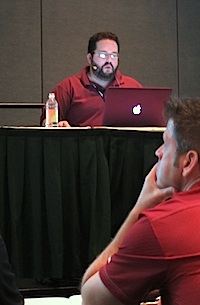
    Rod Harlan was the instructor for the "Tweeting with Authority" session at Photoshop World, March 2011After my sessions with Joe Mcnally Thursday morning I headed to hear a series of talks on social media and blogging. The first was a session called "Tweeting With Authority" by Rod Harlan, wherein he discussed various aspects of how Twitter functions – as well as third party resources. The first key discussion point was understanding that Twitter is all about dialogue. It's not a one-way street; the beauty of the network comes from the interaction between vast ranges of individuals. You have to engage with your audience, and the more you do so the more connected you and your audience will feel. If you work to create a truly personal and beneficial relationship between you and your followers, then you will see the benefits that Twitter has to offer at their greatest potential.

    One of Rod's personal tips was to only use 115-120 of the 140 available characters on Twitter to allow space for people to retweet your post or add their own small thought. He also suggested that if you're lacking substantive or interesting material to tweet about, search through sites like Delicious or StuffToTweet to find neat links to share with your followers. Rod also mentioned several useful third party applications like CoTweet, which allows you to give several people access to the account, SocialOomph that will allow you to schedule tweets, and Untweeps which helps you manage who is following you so you can block spam.

    Blogging for Photographers, slide from the presentation at Photoshop World in Orlando, April 2011Directly following this session was a panel discussion hosted by Scott Kelby, Matt Kloskowski, and Richard Harrington entitled "Blogging for Photographers." Here Scott and the gang provided some very useful, concise pointers on blogging that I'd like to share. Firstly, its important to understand the power you stand to gain from blogging. Traditionally, sharing information with wide audiences was restricted to a small group of privileged individuals who had access to large publishing companies. However, with a blog, you now become your own publisher! You are free to share what you want, when you want, with whoever you want for virtually no cost. This is a tremendous opportunity for yourself or your business that the world has literally never experienced before. Take advantage of it!

    Once you get your blog up and running there are a couple important things to keep in mind. First is consistency. Make a plan. Decide on a reasonable schedule for how many times a week (three is a good starting place) you can absolutely commit yourself to posting, and stick to it. Readers like to have consistency because it gives them something to anticipate, and hence a reason to keep coming back to your site. Also make sure to try and add a photo to every post you make to keep things interesting. Even if you don't have photos laying around to post, you can easily find royalty/license free images online, or even spend a couple bucks to grab some from iStockPhoto.

    Richard Harrington, Scott Kelby and Matt Kloskowski, instructors of the "Blogging for Photographers" session at Photoshop World in Orlando, April 2011

    Most importantly, remember to be yourself. Find your own unique tone, style, or voice, be consistent, and in due time you can have a successful blog. Continue reading →

  • PSW Class Notes: Small Flash Basics & Hot Shoe Flash

    April 1, 2011 Events, Photography, Tips & Tutorials Write Comment

    By Chris Stampar

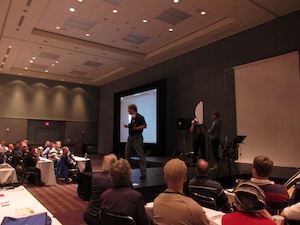
    Joe McNally lectures on Small Flash Basics at Photoshop World in Orlando, March 2011Joe McNally is the master of all things flash, so there was no way I could miss his speed light session at Photoshop World on Thursday morning. Joe's first class focused on getting the most out of one light, and the results are truly amazing. Often people think that to produce beautifully lit photos you need some seriously expensive studio equipment. But that's no longer the case; a small investment into a single speed light and some very cheap, or even DIY light modifiers, can go a long way.

    The first thing Joe pointed out were the three essentials of light: quality, color, and direction. In terms of quality, are we going to use a large, soft light source like an octabank, or will we only fire the bare bulb for harsh lighting effects? More importantly, what effect will that decision have on the mood or feeling of the photo?

    Next is color. Are you looking for daylight balanced flash for a natural look, or will you add a gel to give a colorful flare to your photos? Color is critical, and understanding color symbolism, or the mood that certain colors elicit, is even more beneficial.

    Joe McNally teaches Small Flash Basics at Photoshop World in Orlando, FL, March 2011And lastly, direction. Where will you place your light source and how will this affect your exposure, story, feeling, even composition?


    Joe of course also offered a couple of technical tips to boot. First, the closer the light source is to your subject, the bigger it is relative to the subject, and the softer the light will be. It's also important to understand the difference between exposure compensation and flash compensation. Changing your camera's exposure comp is a "global change" and will affect all aspects of the photo including the ambient light and the effect the flash has on your overall exposure. Changing your flash compensation however, only alters the amount of light that comes from the flash and not the overall exposure of the picture.

    Lastly, using flash is all about experimentation. Don't be afraid to make mistakes, just learn from them! Continue reading →

  • PSW Class Notes: Photo Retouching for Photographers

    March 31, 2011 Events, Photography, Tips & Tutorials Write Comment

    By Chris Stampar

    I attended Scott Kelby's session on Portrait Retouching at Photoshop World. As you could probably guess, it was awesome. Scott is one of the best teachers around. He's got such a relaxed and humorous yet informative teaching style.

    Here are some of the best tips I gleaned from the session:

    Scott puts a lot of emphasis on a model's eyes, and showed an easy way to remove red blood vessels in the eyes in Photoshop. First, choose a small soft brush, set it to 20% opacity, then sample the color directly next to the vein and just paint over it. That simple. Just always make sure you resample next to the vein you want to remove for the most accurate and realistic retouch. And if you think that the resulting texture is a little too unrealistic in the eye, just go to the filter menu, choose add noise, and brush in a little monochromatic noise into the retouched area of the eye for added realism.

    Another great tip for enhancing the eyes is to add an extra catchlight that looks like a soft reflection. Take your Elliptical tool and draw a small oval. Then cut out of chunk of the oval so you end up with a "crescent moon" shaped selection. Fill the selection with white, add a small blur to it in the filter menu, and set the blending mode to soft light. Position the shape appropriately in the eye, and now you have a nice kicker light effect to add a little pop to the photo.

    Moreover, Scott pointed out that you should start every retouch by first removing all blemishes on the subject before you try any other retouching techniques. This will lead to the best results after further retouching. Continue reading →

  • PSW Class Notes: Making an Online Portfolio

    March 31, 2011 Events, Photography, Tips & Tutorials Write Comment

    By Chris Stampar

    The first class I attended at Photoshop World was hosted by RC Concepcion and discussed how photographers can easily get their photos on the web without having to know any technical code. RC focused on some basic tips and ideas of website development as well as free resources on the web. For instance, you can create a full slideshow of your images for free by uploading photos to a set on Flickr, then clicking the "share" button in that set and copy and pasting the HTML code provided for you. You can then embed this full-fledged slideshow anywhere on the web for free, and only with the click of your mouse. No coding necessary! You can also easily leverage Flickr to generate traffic to your website/blog by tagging your photos with relevant tags (city, state, subject, camera, etc.) and including a link to your site in the caption. How easy is that!?

    If you would like to get a little more technical, the Google Chrome web browser includes some great development tools free of charge. Say you're previewing your website in Chrome, but would like to know what an element would look like if it were slightly larger. Instead of going into the files on your computer, changing settings, and re-uploading just to test something, you can preview any changes right in the browser. Simply right click on any element on your site and select "Inspect Element." A new window will appear with the source code of your site. Click the element you want to change and Google will highlight where the code is for that specific object. You can then change any of it's properties like width or height and you'll see those changes instantly in browser. This is a non-destructive, non-permanent way to quickly preview small changes before digging into to your website files and having to re-upload. My little tip is that you can also do this in Firefox with the free FireBug extension. Continue reading →

  • Photoshop World Keynote Merges Tech with Fashion

    March 30, 2011 Events Write Comment

    By Chris Stampar

    The Photoshop World Keynote kicked off bright and early this morning as hundreds of attendees lined up and poured through the doors. The Photoshop Guys did a hilarious spoof video called "Project Photoshop" that was brilliant as usual. There was even a full high fashion runway show featuring off the latest Photoshop fashion designs.

    Especially interesting was Adobe president Johnny L's presentation. Every year he shows off some great new technology that the geniuses at Adobe are working up. There was a clear focus on lens correction capabilities, wherein Bryan Hughes demonstrated how lens distortion in video can be corrected with a simple click all in Photoshop. He also debuted forthcoming technology that allows for user-defined, real time lens correction. This new feature allows a user to simply point at what individual features of a photo should be corrected and will instantly render those changes.

    Johnny also showed how Adobe is integrating tablets into Photoshop. In the "near term," the Apple iPad (other devices in the works) will tether directly inside of Photoshop and allow for control of the application, with a particular focus on color, right from your tablet. How sweet is is that?
    [nggallery id=1] Continue reading →

Items 31 to 40 of 69 total

Page:
  1. Previous
  2. 1
  3. 2
  4. 3
  5. 4
  6. 5
  7. 6
  8. 7
  9. Next
Search
Recent Posts
  • Wild Wednesday: Red-Eyed Tree Frog
  • In the Limelight: Lou Newman
  • In the Limelight: Nick Nieto
Categories
  • Art
  • Contests & Giveaways
  • Deals
  • Events
  • Inspiration
  • Musings
  • Photography
  • Polls
  • Tips & Tutorials
  • Unboxings
Canvas Prints and Gallery Wraps from Artistic Photo Canvas
Tags
  • Christmas
  • Collage
  • Corey Barker
  • holiday
  • humanitarian photography
  • In The Limelight
  • landscape photography
  • LayersTV
  • nature photography
  • NYC skyline
  • panorama
  • photo collage
  • RC Concepcion
  • shipping
  • travel photography
  • Tutorial
  • wild wednesday
  • wildlife photography
APC on Facebook
APC on Twitter
Follow @APCpro
My Cart

You have no items in your shopping cart.

Order Prints
ARTISITIC PHOTO CANVAS
  • Contact Us
  • About APC
  • Options
  • Prices
  • Ideas & Inspiration
  • The APC Difference
  • Photo Canvas Blog
  • Testimonials
  • ProZone
  • Gift Cards
  • Privacy Policy
Tweets about APC
    Get in touch

    Need help?  Call us!
    Monday-Friday 10am-5pm Eastern
    1-800-311-LUXE

    Socialize with us
    • Subscribe to our Blog
    • Connect with us on Facebook
    • Follow us on Twitter
    • See some cool photos
    • See some cool videos

    Copyright © 2005-2026 Luxe Prints LLC. All rights reserved.   Terms of Use

    Credit Cards